Table of Contents
BioStation 3 Menu
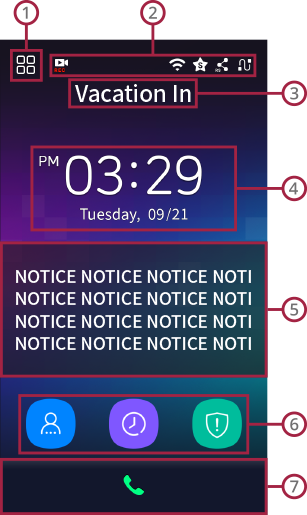

Admin Menu
- You can enroll users or change general settings.
- If an administrator is designated, Admin Menu is accessible only by authentication as an admin. A normal user can refer to only their own event logs after authentication.

Screen Top Icons
 (RTSP): Icon appears when the video of BioStation 3 is streaming through RTSP.
 (WLAN): Icon appears when the device is connected to WLAN network.
 (BioStar 2): Icon appears when the device is connected to BioStar 2.
 (RS-485): Icon appears when the device is connected through RS-485.
 (TCP/IP): Icon indicates the status of TCP/IP network.

T&A Code
T&A code that is set is displayed.

Time
Current time is displayed.

Notice
Notice that is set is displayed.

Function Key (ID, T&A, Arm)
- ID: You can authenticate with user ID.
- T&A: You can select a T&A key. (Only when T&A is in use)
- Arm/Disarm: You can arm or disarm the device. (Only when Intrusion Alarm zone is in use)

Call
You can call one of the extensions that are set. (Only when Intercom is in use)
DASHBOARD
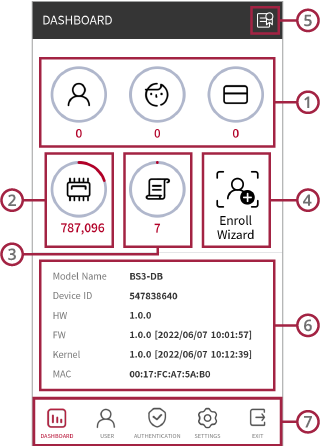
User Usage
You can view the user and credential usage in the device.
Memory Info
You can view the memory usage.
Event Log
You can view event logs and also search, and delete event logs.
Enroll Wizard
You can enroll a new user.
Regulatory & Licenses
You can consult regulatory and license information of BioStation 3.
Device Information
You can view the device information.
Bottom Menu
- USER: You can view enrolled users and also search, enroll, modify, and delete users.
- AUTHENTICATION: You can set Authentication, T&A settings.
- SETTINGS: You can set Display & Sound, Network, and System Settings.
- EXIT: You can move to the main page by tapping Exit.